← All projects

Project · Up and running

SDR Station

Short version: it's another SDR. Long version: it's our SDR, and that makes all the difference. It receives and transmits, runs a Hermes Lite 2, and lives on Linux. And no, we won't be porting it to Windows, Mac or anything else, so don't ask.

It took two weeks and a lot of late nights, and along the way it spawned about seven other projects.

2 weeksfrom idea to on air
RX + TXnot just receive
7projects spun off
1rainy afternoon
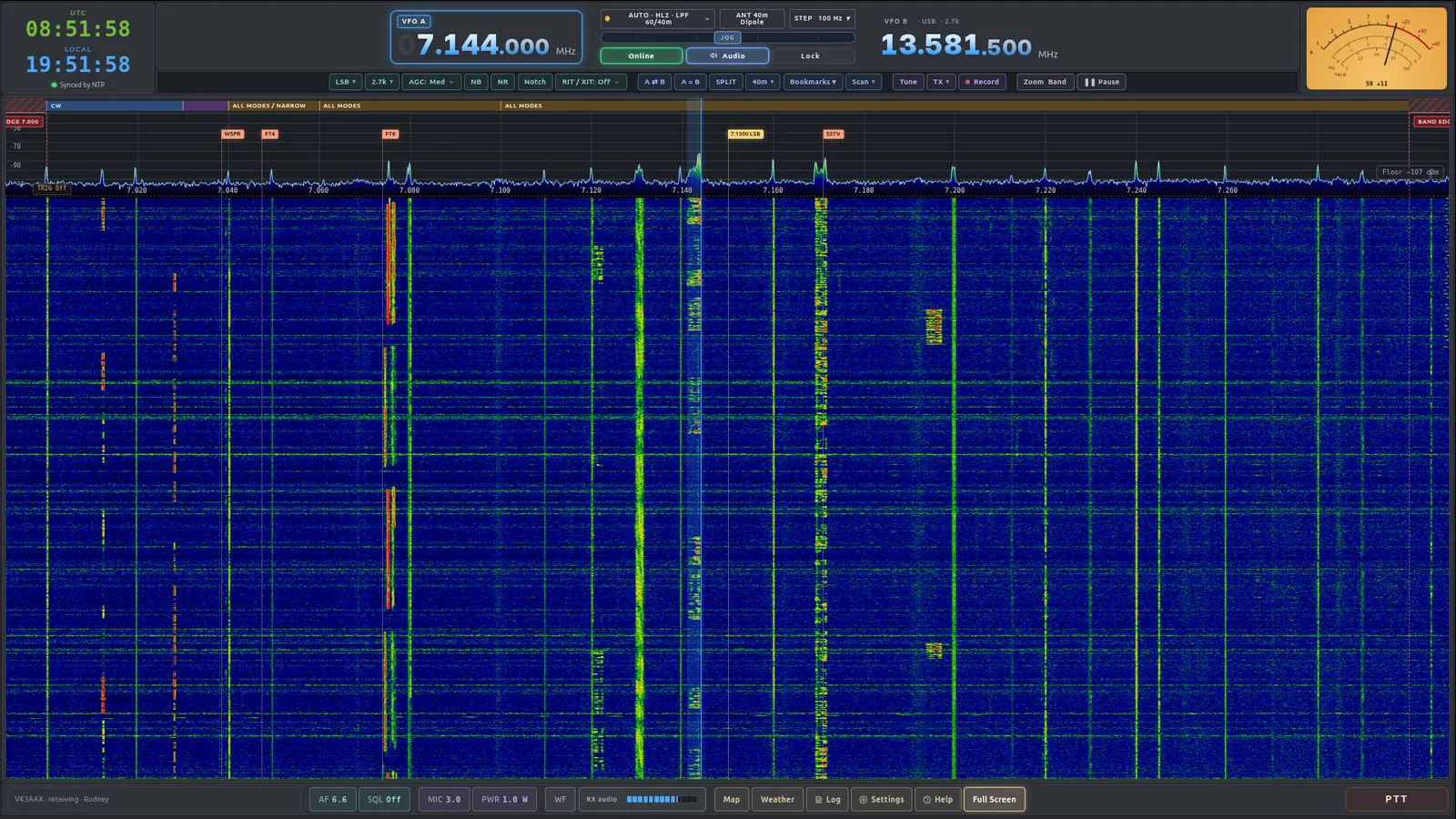
SDR Station main screen tuned to 7.144 MHz on 40 m, with the band plan, spectrum, a busy waterfall, the toolbar and an analogue-style S meter
The main screen on 40 m: the band plan along the top, the spectrum and waterfall below, and a proper needle S meter in the corner.

The hardware

In the shack

The heart of it is a Hermes Lite 2, a little open-source radio that puts out about 5 watts. The SDR takes care of everything else: the screen, the controls and the clever bits. It all runs on an i7 NUC that's about six years old (nobody can quite remember buying it) and Linux Mint, set up to look a lot like the SDR. That's probably why the SDR looks the way it does.

Plug in a cheap RTL-SDR dongle and it gets spotted automatically. Tune past the top of the Hermes Lite's range and the SDR quietly hands over to the dongle, so you can keep listening right up past 70 cm. Transmit is switched off up there, of course.

Out the back there's a 40 m half-wave dipole, which now behaves itself thanks to the SWR Sweep below.

As a basic SDR, it's all there

What it does

Yes, it does all the usual SDR stuff. It also does a few tricks of its own.

Tuning & filters

Two VFOs (use either, or split them), all the usual filters, and RIT/XIT. If a signal's an odd shape, you can drag the filter to fit and it remembers the custom width until you pick a standard one again.

Band plan & repeaters

The band plan is drawn right on the spectrum. Wander out of band and transmit switches off. Cross into a new part of the band and the mode changes to suit. Repeaters show up in green: click one to tune straight to it and see its details. You can add your own bookmarks too.

Audio

Separate EQs for transmit and receive, plus the tools a studio would use to make a voice sound clean and punchy. Record a 10 second test, then flip between the before and after to hear the difference.

CW

A decoder built from scratch that learns how fast the other station is sending and has a fair guess at letters it missed. For sending, there are CQ memories, voice recordings on the F keys, and a big typing window so you can check your message before you let it rip.

Where in the world

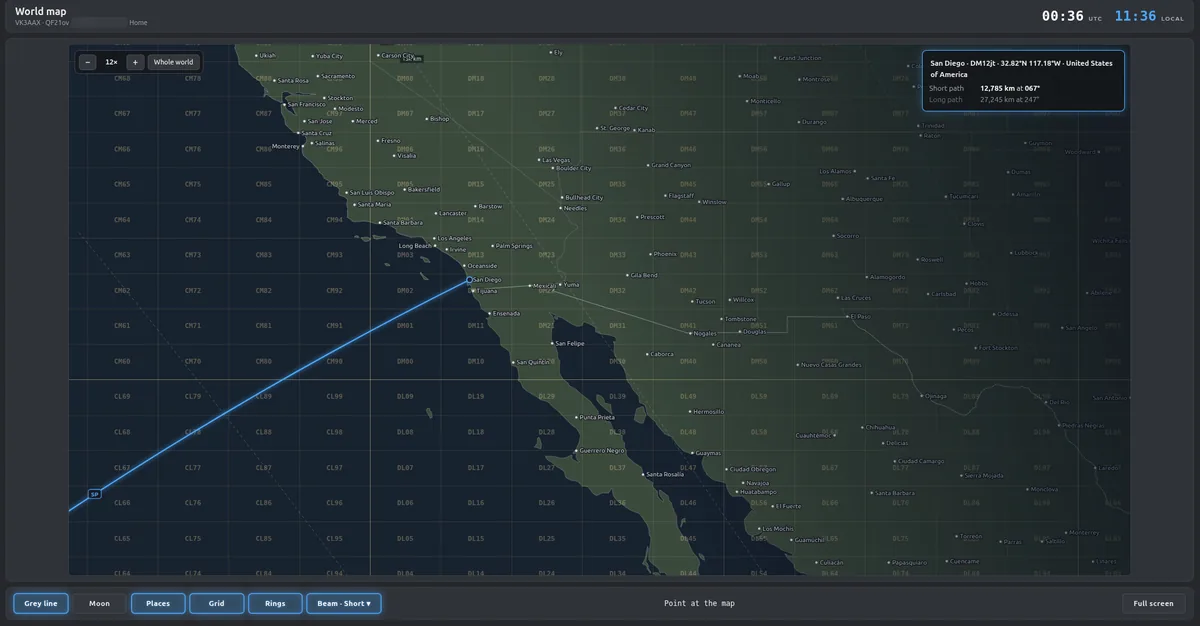
Wherever you point on the map, it tells you the grid square, how far away it is and which country you're over.

Logging & digital modes

Log a contact without leaving the screen, and pull up the other station's QRZ page with one click. WSJT-X plugs straight in for the digital modes.

Remote

Log in from anywhere and use it like a web receiver. Transmit needs the station owner's permission, and there are no open doors to the internet. Everything goes through a private, encrypted connection.

The fun stuff

Highlights

SWR Sweep

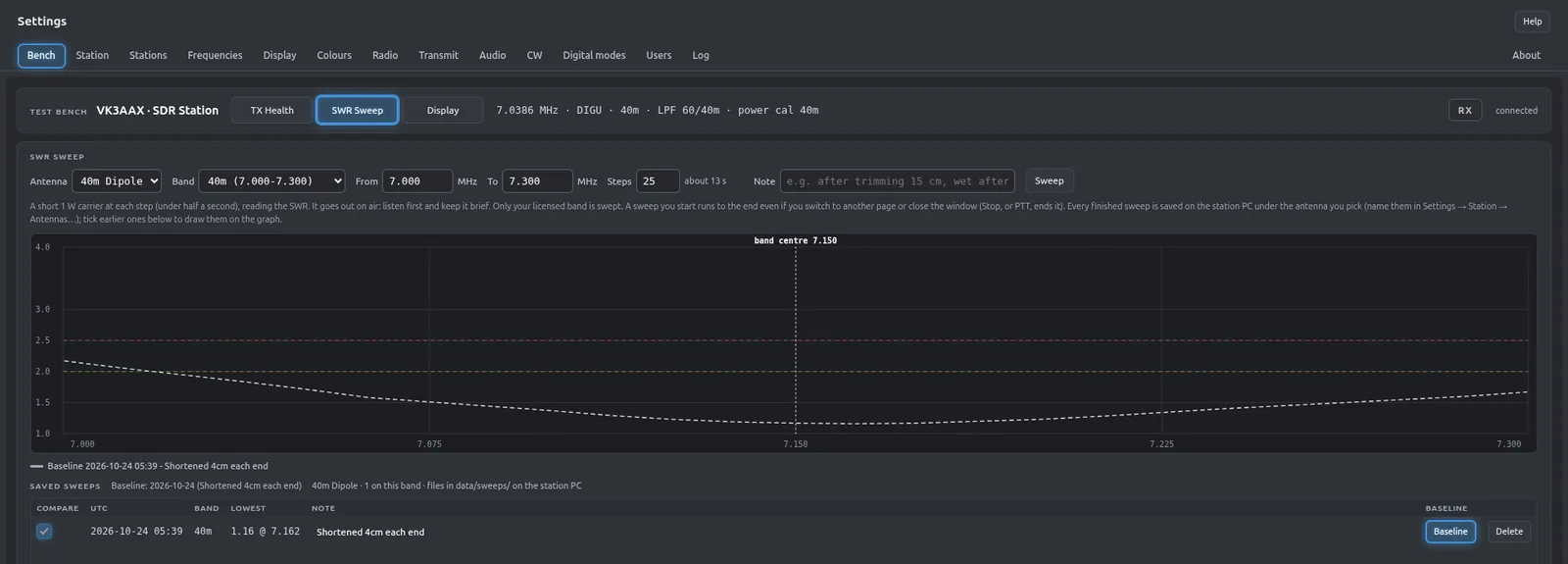
We didn't know if the 40 m dipole was tuned, and the ATU couldn't be connected, so a sweep went into the SDR. It steps across the band sending a very short, low-power signal, graphs the SWR, and tells you how much to trim or lengthen the antenna to centre it. You can save sweeps and compare them later.

Real result: the dipole was 32 cm too long on each end. Half an hour in the rain fixed it, and it now sits at 1.2:1 in the middle of 40 m.

SWR sweep graph of a 40 m dipole, dipping to 1.16 near the middle of the band
After the trim: the curve dips right by the band-centre line.

Status Display

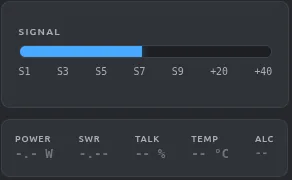
A small panel under the S meter keeps an eye on things. Yellow warnings clear themselves once the problem's gone. Red ones, like trying to transmit into a bad SWR, stop you and need acknowledging.

The bug hunt: chasing one of those warnings led to a full rewrite of how the screen gets drawn. It now runs at a smooth 25 frames a second on that six-year-old PC.

We tried to make it stumble for a screenshot: multiple browsers, a pile of terminals, everything running at once. It wouldn't budge. So you'll have to take our word for what the yellow warning looks like.

SDR Station S meter and Status Display panel
The S meter and Status Display, sitting quietly with nothing to report.

World map

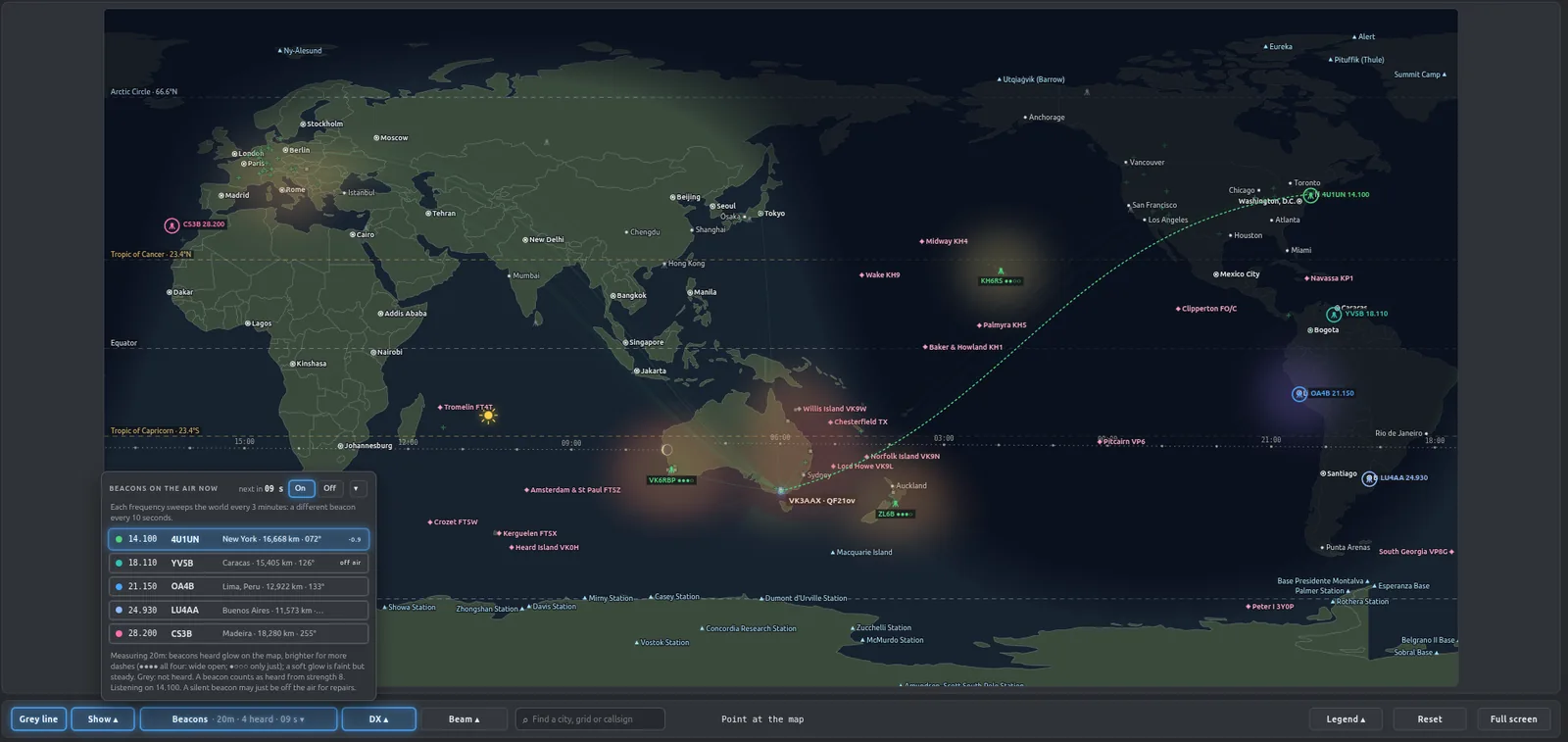
Click the clocks and the whole world opens in its own window, with the shack right in the middle and the Pacific in one piece, the way it should look from down here. It's made to live on a second screen and keep itself up to date all evening.

SDR Station world map with glowing beacons and warm band-open patches over Europe, Australia and the Americas, a dotted path from Victoria to New York, and a panel listing the beacons on the air
Twenty metres on a November evening: the beacons that made it through are glowing, the warm patches show where the band's open, and the Beam is lined up on New York.

Scroll in on Europe, the USA or anywhere you fancy, and drag around. The coastlines sharpen up as you go, and state borders appear. Switch on Places and the cities fill in: just the big names from far away, then more and more as you get closer, right down to the little towns. Antarctic bases and the rare DX islands everyone chases are always on show.

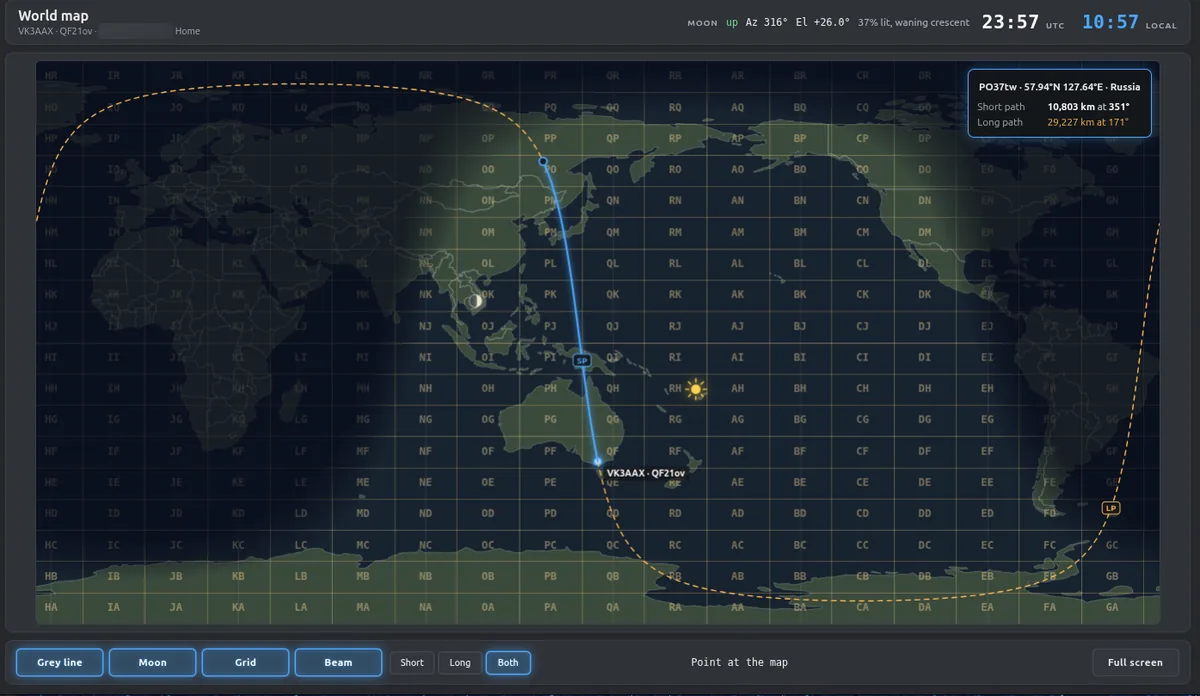
Switch on the grey line and you can watch night creep across the map, with a soft twilight band and a little sun marking where it's directly overhead. That fuzzy edge is where the low bands like to open up. Pick a path from the Beam menu (short, long or both), then click anywhere, or on a city. The path lights up from the shack with a little SP or LP tag, the distance and the bearing to point at. Distance rings spread out around the shack, and a small cross marks the antipode, the spot on the exact opposite side of the world.

There's a beacon clock too. Eighteen little stations around the world take turns sending on five bands, and the map shows which one's on right now. Click a band and the station tunes straight there, so you can hear for yourself whether it's open.

It even joins in when you're logging. Start typing a callsign and the map swings round to face that station, with the distance, the bearing and when the sun's coming up over there, all ready before you've said "you're 5 and 9". If it's someone you've worked before, it already knows exactly where they are. Switch on Log and every contact appears as a coloured dot, one colour per band, so you can watch them spread across the globe. Today's sunrise and sunset for the shack sit up in the corner too.

The Moon's up there too, drawn in its real phase. Switch it on and the top bar tells you whether it's up at the station, which way to look and how high it is. Handy if you ever feel brave enough to bounce a signal off it.
Fun fact: the long way to that spot in Russia is 29,227 km, nearly three times the short way. The map works it out before you've let go of the mouse.

There's a lot more coming

Coming soon

  • More power5 watts doesn't really get you heard, so the next job is getting the SDR to talk to a linear amplifier. That means a little Arduino helper to keep the two in step across the bands.
  • Turning the antennaThe world map's here. Next comes a rotator, and then you'll be able to click somewhere on the map and have the antenna turn to face it.
  • Chasing satellitesAutomatic tracking, with the SDR correcting the frequency as the satellite whizzes overhead.
  • More radiosThe IC-7100 is first in line, and its audio already travels over the network thanks to Radio over Ethernet. Next is bringing it into the SDR itself.

This one stands on a lot of shoulders. Thanks to everyone who helped make it happen →

Fancy running it yourself? Drop us a line.

Get in touch